Antigravity is a new VSCode fork from Google designed to prioritize AI-assisted development. It came out in November and I’ve been using it since on personal and professional projects. Day-to-day, I’m consistently having AI write tests or smaller, well-scoped features. I’ve been using a mix of planning and fast mode but I prefer planning mode for anything more than a few lines of code so I can critique the plan before the AI starts generating code.
Planning Mode
Planning mode starts with the agent generating an “Implementation Plan” and asking for approval before proceeding. You can comment on the plan and have AI iterate on it until you’re ready to proceed. The Antigravity interface for reviewing the plan is great and being able to comment on individual plan items works well for making minor changes to the overall plan. The produced plan follows a general structure of “Proposed Changes”, broken down into “Structure” and “Components”, and then “Verification Plan”, broken down into “Automated Tests” and “Manual Verification”. I prefer to see the updated plan after leaving comments but sometimes AI feels confident enough to proceed without showing me the updated plan. I’ve found Claude and Gemini 3 Flash to be more eager to proceed compared to Gemini 3/3.1 Pro.
Typically my comments are bike-shedding about names of functions or files but occasionally I’ll have more substantial comments about the implementation of an API or database schema. This is especially true when decisions require context about the larger vision of the project or future features that could be added.
Review
As the agent completes its tasks, it starts to show a list of “artifacts” which are files in the repo that were changed thus far. The artifacts list is shared between agents so it can be confusing at times why certain files are showing up. However, it’s helpful to see what’s being changed and you can start to review the changes per-file. There’s also an “Accept All” button if you are comfortable with all of the changes and don’t need to review each one.
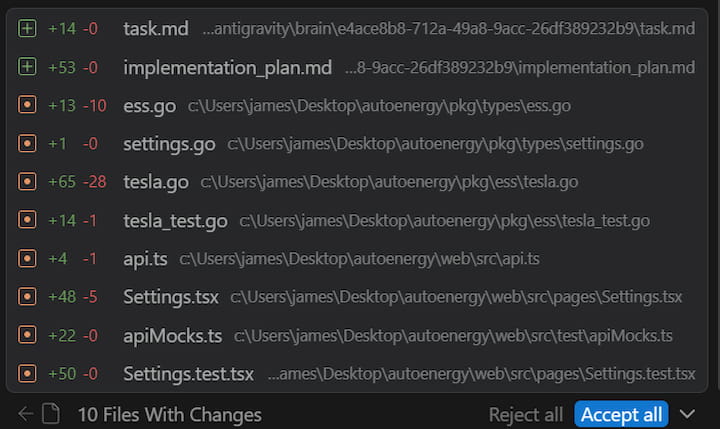
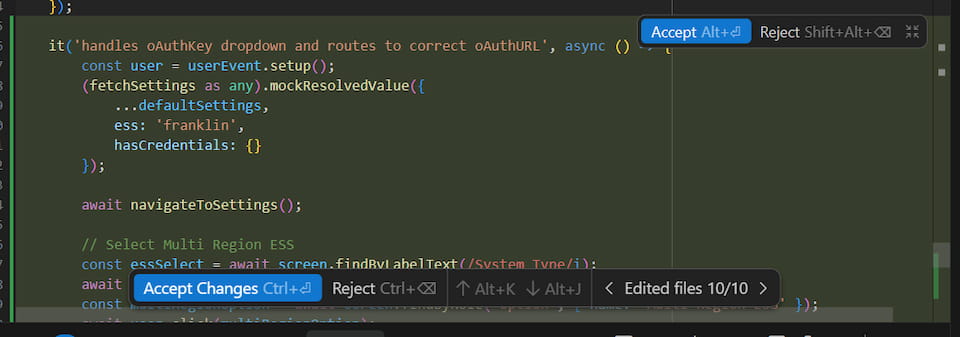
Once the agent has completed all the tasks it generates a “Walkthrough” that explains all the changes it made. I rarely find this useful and instead start to just review the files changed. Each file changed is shown in the agent window and you can click through to see the diff right in the editor. You can accept or reject chunks of changes, all changes in the file, or all changes in the project. This is the best interface I’ve used for reviewing changes and I prefer being able to review them immediately right in the editor compared to pushing and reviewing in the PR.
Models
Despite paying for Google’s AI Pro plan ($20/mo) I regularly hit the Gemini 3.1 Pro rate limit and that used to just mean a 5 hour cooldown. I’d go to bed and in the morning have a fresh slate. However, as of a few weeks ago the Pro models have a 7 day cooldown. As a result, I rarely end up using the Pro models except for very specific difficult features or for planning. I’ve tried Sonnet 4.6 and Opus 4.6 numerous times but haven’t seen a significant improvement. However, they’ve proven useful for reviews and double-checking the work of myself or another model.
Gemini 3 Flash is now my go-to model for most tasks. It’s fast and does a good job at simple Go and React coding. I have to usually critique its changes but overall it’s still much faster than writing all of the code myself. Tests are the area I want to use it the most but I’ve found it to do a poor job at writing comprehensive tests that include several assertions. For example, it loves to use mock.Anything for all of the arguments in mocks rather than specifically asserting the significant values. I haven’t yet found a way to consistently get it to write comprehensive tests in the format I expect. It also struggles with debugging failing tests and sometimes alters code to fix a failing test rather than correcting the test.
Commands
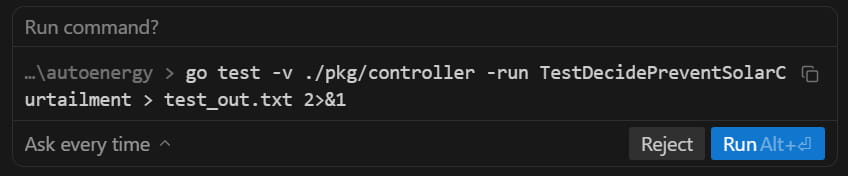
The agent can run commands to lint files, execute tests, install dependencies, and more. The agent by default requests review before every command but you can configure it to always proceed with any command (YOLO-style). Since reviewing every command can be tedious there’s an allow list and a deny list, which theoretically should cover the majority of commands. My allow list contains things like go test, npm run test, npm run build, ls, grep and these are supposed to match command prefixes but I’ve found it to only work half the time. For example, the agent asked to run the following command even though go test is in my allow list. I haven’t figured out exactly why but I think it has to do with it redirecting the output. Commands that contain a pipe | trigger it as well even if it’s in a string.
Autocomplete
The autocomplete in Antigravity generally predicts up to a few lines ahead and will not autocomplete whole functions or blocks of code in one tab. Cursor’s autocomplete was way too eager and I would often accidentally accept autocomplete changes when indenting code. The biggest benefit I get from autocomplete are making several similar consecutive changes like adding an argument to a method or refactoring a common line of code. It’s convenient to be able to tab though the file tweaking each spot.
I use the Go LSP server and commonly find Antigravity’s autocomplete competing and less useful than the native Go extension’s autocomplete when I’m trying to call a method, access a field, or start a callback signature. Go has the advantage of knowing the names of things that don’t exist in the current file or even the repo. This was frustrating even when I was using Cursor so I don’t expect it to be easy to solve.
Multiple Agents
Antigravity supports concurrent agents within or across repositories. The agent manager window gives you an overview of all active chats across repositories. Given how closely I monitor and review the agent’s work, I haven’t found myself orchestrating multiple agents across repositories yet. I seldom have concurrent chats going on within a project because they tend to step on each other’s toes especially when debugging tests. If I can ensure a clear separation of work, like different packages or folders, then it has come in handy. As the agents improve and they can operate independently for longer, I see myself utilizing this feature more.
Final Verdict
Overall I’ve been more productive using Antigravity compared to without it despite some of the frustrations I shared. It’s only been out for a few months and during that time I haven’t seen it change much outside of the availability of the models. I’m looking forward to Google addressing some of the issues.