Looker is a BI platform powered by a semantic layer written in LookML. Users can to create dashboards, explore data, and export reports all without needing to involve engineering. However, before that can happen, you need to format your data in a user-friendly way and anticipate usage patterns to speed up queries and reduce execution cost. One way is using a Persistent Derived Table (PDT), which is esentially Looker’s version of a materialized view.
Here’s an example of how you would define a PDT that is incrementally refreshed every hour:
view: my_summary {
  derived_table: {
    sql_trigger_value: SELECT EXTRACT(HOUR FROM CURRENT_TIMESTAMP()) ;;
    increment_key: "inserted_date"
    sql:
      SELECT ...
      FROM ...
      WHERE {% incrementcondition %} inserted_time {% endincrementcondition %}
        ;;
  }
  dimension_group: inserted {
    type: time
    timeframes: [date, week, month, year]
    datatype: date
    sql:  ${TABLE}.inserted_time
    ;;
  }
}
You’ll probably want to also define partition_keys, cluster_keys, increment_offset and some other fields, but for the purposes of this post, we’ll ignore them.
When the sql_trigger_value query produces a different value Looker will automatically increment your PDT by running the underlying query for a timeframe defined by the increment fields. You can define complex trigger queries to basically run whenever you want, provided you can conjure up some query.
The increment_key must be a time-based dimension and when Looker increments the PDT it will define bounds in your WHERE clause (using the incrementcondition Liquid tag) to limit the scope of the underlying query. Assuming the underlying table is partitioned by time, this will significantly reduce the scope of the query needed, therefore reducing the cost of incrementing. Inefficient PDT generation can easily balloon costs if you’re not careful.
The key’s dimension is inserted_date above which specifically is the date timeframe of the inserted dimension group. This meta dimension is created automatically when you define the timeframes of the time-based dimension group itself.
Each increment, Looker will query your table to find the maximum increment_key value and use that to form the incrementcondition. If you use increment_offset it will subtract that offset from the resulting watermark.
SELECT
  FORMAT_TIMESTAMP('%F %T', MAX(my_summary.inserted_time)) AS offset_watermark
FROM (
  SELECT
    (TIMESTAMP_TRUNC(my_summary.inserted_time , DAY)) AS my_summary.inserted_time,
    COUNT(*) AS `__empty_count`
  FROM `my_summary` AS my_summary
  GROUP BY 1
  LIMIT 1000
)
This query is horribly inefficient since it has to look at the whole table every single increment and Looker has known about this for years now without any change so I don’t see it being fixed any time soon.
Anyways, the key’s meta field is exactly what went wrong earlier this year when we received an alert that a PDT was failing to build. It can be easy to forget to append a timeframe suffix and when you do, Looker successfully builds the initial PDT but then fails to increment the PDT.
Build Error
When the PDT fails to increment you’re faced with an obscure “Build Error” and the PDT will be labeled “Old Build, Incremental”. The details for the PDT says that the error was “build skipped due to error in required child” which erroneously seems to point to a child PDT, of which there aren’t any.
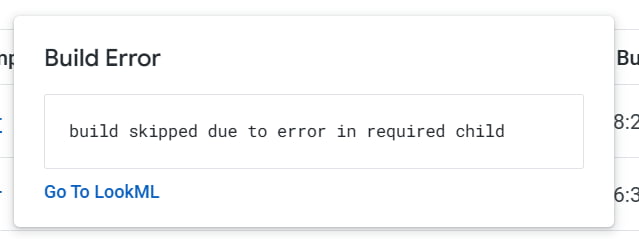
Unfortunately, trying to find the error in the logs means perfecting timing the log page, since it only shows you a snapshot of a couple hundred lines. If you manage to time it right you’d see an error saying a table or dataset was not found along with the query SELECT * FROM FATAL_ERROR_my_summary LIMIT 0 which isn’t particularly helpful and a stack trace which roughly is regenerate_table → display_sql → sql_table_incrementer → result_column_names → columns. I could never figure out why it adds FATAL_ERROR to the table name but it probably has to do with the incrementer code not being able to directly return an error and so by making up a table name, assuming no table is prefixed with that, it can still cause an error.
In the end, the errors and logs were not helpful and only after another review of the PDT did we realize it had increment_key: "inserted" instead of "inserted_date". Changing that and deploying fixed the PDT after the next trigger.
Other Build Errors
In case you came here trying to figure out what “build skipped due to error in required child error” could possibly mean, we’ve also seen the same error when the watermark query above queries more than your Maximum Billing Gigabytes threshold. If this could be the case, check your “Project History” in BigQuery Studio, find the watermark query (search for “watermark”), and see if it failed with “Query exceeded limit for bytes billed”.