<?xml version="1.0" encoding="utf-8"?>
<?xml-stylesheet type="text/xsl" href="/feeds/atom-style.xsl"?>
<feed xmlns="http://www.w3.org/2005/Atom">
    <id>https://jameshartig.dev</id>
    <title>James Hartig</title>
    <updated>2026-03-25T04:56:19.162Z</updated>
    <generator>Astro Chiri Feed Generator</generator>
    <author>
        <name>James Hartig</name>
        <uri>https://jameshartig.dev</uri>
    </author>
    <link rel="alternate" href="https://jameshartig.dev"/>
    <link rel="self" href="https://jameshartig.dev/atom.xml"/>
    <subtitle>The technical blog of James Hartig. Deep dives into real-world engineering challenges and technology explorations.</subtitle>
    <rights>Copyright © 2026 James Hartig</rights>
    <entry>
        <title type="html"><![CDATA[The Antigravity IDE]]></title>
        <id>https://jameshartig.dev/2026-antigravity</id>
        <link href="https://jameshartig.dev/2026-antigravity"/>
        <updated>2026-03-24T00:00:00.000Z</updated>
        <summary type="html"><![CDATA[Antigravity is a new VSCode fork from Google designed to prioritize AI-assisted development. It came out in November and I’ve been using it since on personal and professional projects. Day-to-day, I’m...]]></summary>
        <content type="html"><![CDATA[<p><a href="https://antigravity.google/">Antigravity</a> is a new VSCode fork from Google
designed to prioritize AI-assisted development. It came out in November and
I’ve been using it since on personal and professional projects. Day-to-day, I’m
consistently having AI write tests or smaller, well-scoped features. I’ve been
using a mix of planning and fast mode but I prefer planning mode for anything
more than a few lines of code so I can critique the plan before the AI starts
generating code.</p>
<h2>Planning Mode</h2>
<p>Planning mode starts with the agent generating an “Implementation Plan” and
asking for approval before proceeding. You can comment on the plan and have AI
iterate on it until you’re ready to proceed. The Antigravity interface for
reviewing the plan is great and being able to comment on individual plan items
works well for making minor changes to the overall plan. The produced plan
follows a general structure of “Proposed Changes”, broken down into “Structure”
and “Components”, and then “Verification Plan”, broken down into “Automated Tests”
and “Manual Verification”. I prefer to see the updated plan after leaving
comments but sometimes AI feels confident enough to proceed without showing me
the updated plan. I’ve found Claude and Gemini 3 Flash to be more eager to
proceed compared to Gemini 3/3.1 Pro.</p>
<p>Typically my comments are bike-shedding about names of functions or files but
occasionally I’ll have more substantial comments about the implementation of an
API or database schema. This is especially true when decisions require context
about the larger vision of the project or future features that could be added.</p>
<h2>Review</h2>
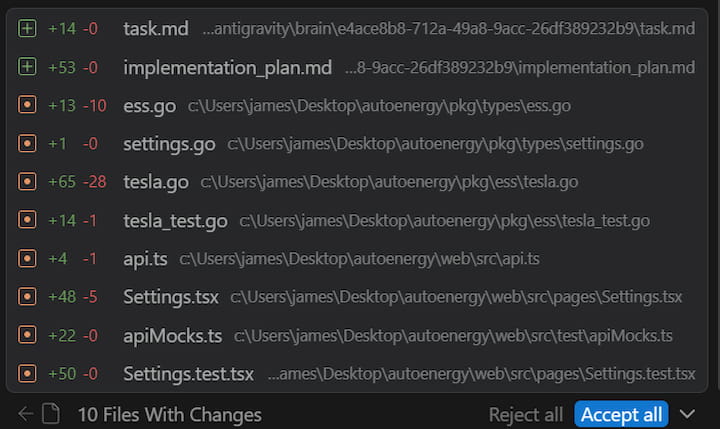
<p>As the agent completes its tasks, it starts to show a list of “artifacts” which
are files in the repo that were changed thus far. The artifacts list is shared
between agents so it can be confusing at times why certain files are showing up.
However, it’s helpful to see what’s being changed and you can start to
review the changes per-file. There’s also an “Accept All” button if you are
comfortable with all of the changes and don’t need to review each one.</p>
<p><img src="https://jameshartig.dev/_astro/artifacts.BrTAEvo7_1obIIc.jpg" alt="Artifacts" /></p>
<p>Once the agent has completed all the tasks it generates a “Walkthrough” that
explains all the changes it made. I rarely find this useful and instead start to
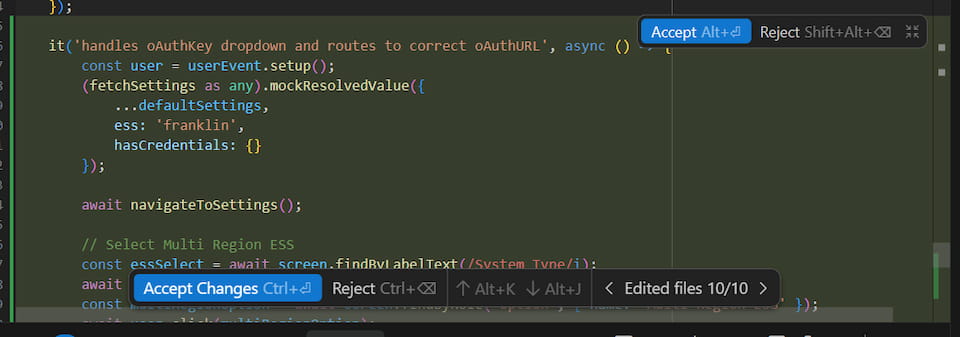
just review the files changed. Each file changed is shown in the agent window and
you can click through to see the diff right in the editor. You can accept or
reject chunks of changes, all changes in the file, or all changes in the project.
This is the best interface I’ve used for reviewing changes and I prefer being
able to review them immediately right in the editor compared to pushing and
reviewing in the PR.</p>
<p><img src="https://jameshartig.dev/_astro/review.RP3RzhRE_ZOtKa8.jpg" alt="Diff Review" /></p>
<h2>Models</h2>
<p>Despite paying for Google’s AI Pro plan ($20/mo) I regularly hit the Gemini 3.1
Pro rate limit and that used to just mean a 5 hour cooldown. I’d go to bed and
in the morning have a fresh slate. However, as of a few weeks ago the Pro models
have a 7 day cooldown. As a result, I rarely end up using the Pro models except
for very specific difficult features or for planning. I’ve tried Sonnet 4.6 and
Opus 4.6 numerous times but haven’t seen a significant improvement. However,
they’ve proven useful for reviews and double-checking the work of myself or
another model.</p>
<p>Gemini 3 Flash is now my go-to model for most tasks. It’s fast and does a good
job at simple Go and React coding. I have to usually critique its changes but
overall it’s still much faster than writing all of the code myself. Tests are
the area I want to use it the most but I’ve found it to do a poor job at writing
comprehensive tests that include several assertions. For example, it loves to use
<code>mock.Anything</code> for all of the arguments in mocks rather than specifically
asserting the significant values. I haven’t yet found a way to consistently get
it to write comprehensive tests in the format I expect. It also struggles with
debugging failing tests and sometimes alters code to fix a failing test rather
than correcting the test.</p>
<h2>Commands</h2>
<p>The agent can run commands to lint files, execute tests, install dependencies,
and more. The agent by default requests review before every command but you can
configure it to always proceed with any command (YOLO-style). Since reviewing
every command can be tedious there’s an allow list and a deny list, which
theoretically should cover the majority of commands. My allow list contains things
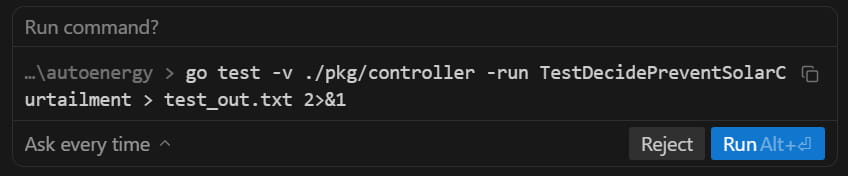
like <code>go test</code>, <code>npm run test</code>, <code>npm run build</code>, <code>ls</code>, <code>grep</code> and these are
supposed to match command prefixes but I’ve found it to only work half the time.
For example, the agent asked to run the following command even though <code>go test</code>
is in my allow list. I haven’t figured out exactly why but I think it has to do
with it redirecting the output. Commands that contain a pipe <code>|</code> trigger it as
well even if it’s in a string.</p>
<p><img src="https://jameshartig.dev/_astro/run-command.Dm8Fy7zQ_cxzb9.jpg" alt="go test Ask" /></p>
<h2>Autocomplete</h2>
<p>The autocomplete in Antigravity generally predicts up to a few lines ahead and
will not autocomplete whole functions or blocks of code in one tab. Cursor’s
autocomplete was way too eager and I would often accidentally accept autocomplete
changes when indenting code. The biggest benefit I get from autocomplete are making
several similar consecutive changes like adding an argument to a method or
refactoring a common line of code. It’s convenient to be able to tab though the
file tweaking each spot.</p>
<p>I use the Go LSP server and commonly find Antigravity’s autocomplete competing
and less useful than the native Go extension’s autocomplete when I’m trying to
call a method, access a field, or start a callback signature. Go has the advantage
of knowing the names of things that don’t exist in the current file or even the
repo. This was frustrating even when I was using Cursor so I don’t expect it to
be easy to solve.</p>
<h2>Multiple Agents</h2>
<p>Antigravity supports concurrent agents within or across repositories. The agent
manager window gives you an overview of all active chats across repositories. Given
how closely I monitor and review the agent’s work, I haven’t found myself
orchestrating multiple agents across repositories yet. I seldom have concurrent chats
going on within a project because they tend to step on each other’s toes especially
when debugging tests. If I can ensure a clear separation of work, like different
packages or folders, then it has come in handy. As the agents improve and they
can operate independently for longer, I see myself utilizing this feature more.</p>
<h1>Final Verdict</h1>
<p>Overall I’ve been more productive using Antigravity compared to without it
despite some of the frustrations I shared. It’s only been out for a few months
and during that time I haven’t seen it change much outside of the availability of
the models. I’m looking forward to Google addressing some of the issues.</p>
]]></content>
        <published>2026-03-24T00:00:00.000Z</published>
    </entry>
    <entry>
        <title type="html"><![CDATA[BigQuery Table Sampling]]></title>
        <id>https://jameshartig.dev/2025-bigquery-tablesample</id>
        <link href="https://jameshartig.dev/2025-bigquery-tablesample"/>
        <updated>2025-11-08T00:00:00.000Z</updated>
        <summary type="html"><![CDATA[In 2021, BigQuery announced a new TABLESAMPLE operator which can be used to read a subset of your data to reduce query costs when your query doesn’t need all the data. The documentation describes the ...]]></summary>
        <content type="html"><![CDATA[<p>In 2021, BigQuery announced a new <a href="https://docs.cloud.google.com/bigquery/docs/table-sampling"><code>TABLESAMPLE</code> operator</a>
which can be used to read a subset of your data to reduce query costs when your
query doesn’t need all the data. The documentation describes the feature as a
way to “query random subsets of data” but depending on how your table is
configured, this method can be dangerously misleading.</p>
<p>BigQuery tables can be <a href="https://docs.cloud.google.com/bigquery/docs/partitioned-tables">partitioned</a>
and <a href="https://docs.cloud.google.com/bigquery/docs/clustered-tables">clustered</a>.
Partitions divide your data into integer-based or date-based blocks colocating
in storage with the same values. Clustering further sorts the rows within those
partitions by the specified columns. Partitioning and clustering can be used to
significantly optimize query performance by reducing how much data is processed
when the queries filter on those columns. Keep in mind that the BigQuery bytes
estimate for a query takes into account partitioning but not always clustering.</p>
<p>Table sampling works by selecting a subset of the data blocks necessary for a
given query. So a table sample of 50 percent will roughly read half of the data
blocks, assuming the table is sufficiently large and has many data blocks.</p>
<h2>Examples</h2>
<p>Let’s look at some examples of queries that use all three techniques using the
<a href="https://console.cloud.google.com/bigquery?ws=!1m5!1m4!4m3!1sbigquery-public-data!2swikipedia!3spageviews_2025"><code>pageview_2025</code> table</a>
of the public wikipedia dataset.</p>
<p>The first query simply counts how many rows are in the table but this requires
reading over 800GB of data. That’s pretty inefficient and in fact, this table is
configured with a required partition filter, so you can’t even run this query. If
you could, it would return 158,583,259,826 views.</p>
<pre><code class="language-sql">SELECT SUM(views)
FROM `bigquery-public-data.wikipedia.pageviews_2025`
</code></pre>
<p>Let’s reduce the number of partitions by including a WHERE clause on the
<code>datehour</code> column to limit the rows to only those in October and switch to getting
the total pageviews. This query reads only 72GB of data, processing 4,876,284,775
rows for a total of 14,445,367,832 views.</p>
<pre><code class="language-sql">...
WHERE TIMESTAMP_TRUNC(datehour, DAY) &gt;= "2025-10-01"
  AND TIMESTAMP_TRUNC(datehour, DAY) &lt; "2025-11-01"
</code></pre>
<p>This table is also clustered by the <code>wiki</code> (subdomain) and <code>title</code> columns to
allow for efficient pageview counts by page and domain. If we also filter on
<code>wiki</code> (one of the clustering columns) in our query we will further reduce the
data that’s read. This query only reads 6GB of data and it returns 267,013,325.</p>
<pre><code class="language-sql">...
  AND wiki = 'de'
</code></pre>
<p>We could sample on a per-row basis using <code>RAND()</code> and BigQuery would have to
read all of the data. We just determined that was 6GB and this query returns
26,494,288 (your results may vary).</p>
<pre><code class="language-sql">...
  AND RAND() &lt; 0.1
</code></pre>
<p>In contrast, if we use <code>TABLESAMPLE</code> to add sampling of 10 percent, full query
shown below, BigQuery will roughly read a tenth of the data blocks. The following
query reads only 544MB of data.</p>
<pre><code class="language-sql">SELECT SUM(views)
FROM `bigquery-public-data.wikipedia.pageviews_2025`
TABLESAMPLE SYSTEM (10 PERCENT)
WHERE TIMESTAMP_TRUNC(datehour, DAY) &gt;= TIMESTAMP("2025-10-01")
  AND TIMESTAMP_TRUNC(datehour, DAY) &lt; TIMESTAMP("2025-11-01")
  AND wiki = 'de'
</code></pre>
<p>Let’s run that query 10 times:</p>
<table>
<thead>
<tr>
<th>SUM(views)</th>
</tr>
</thead>
<tbody>
<tr>
<td>13070664</td>
</tr>
<tr>
<td>26763419</td>
</tr>
<tr>
<td>11474972</td>
</tr>
<tr>
<td>10293222</td>
</tr>
<tr>
<td>14133034</td>
</tr>
<tr>
<td>11399557</td>
</tr>
<tr>
<td>9144304</td>
</tr>
<tr>
<td>13571541</td>
</tr>
<tr>
<td>18521447</td>
</tr>
<tr>
<td>30895814</td>
</tr>
</tbody>
</table>
<p>Notice the massive variance, ranging from 9 million to over 30 million views. The
total views was 267 million so we would’ve expected around 26 million as a result
and we only got close to that result twice.</p>
<h2>Sampling Bias</h2>
<p>The pageview data for October contains 1,980 distinct <code>wiki</code> values and
238,667,980 distinct <code>title</code> values. Remember that clustering sorts similar rows
together in data blocks and table sampling will limit the query to a subset of
those blocks. As we just saw, this can lead to sampling bias if the features are
used together for a query. The last query looks at only a tenth of the blocks and
depending on which titles and which times are included in those blocks you get
vastly different answers.</p>
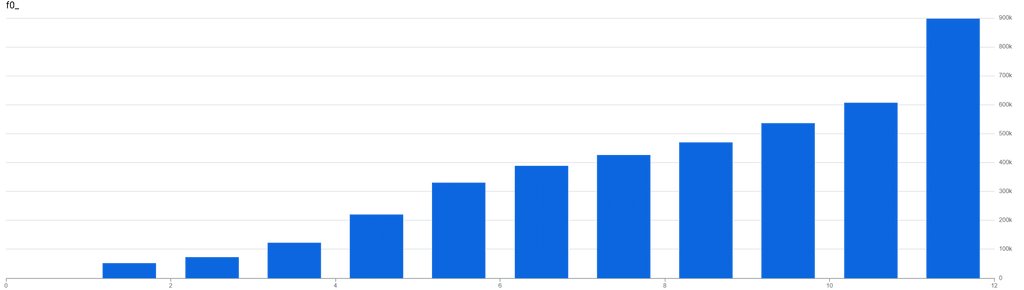
<p>For a given hour in October for the <code>de</code> wiki gets between approximately 52,000
views and 897,000 views with the following distribution:</p>
<p><img src="https://jameshartig.dev/_astro/hour_distribution.FpwPjanj_19GVKP.png" alt="Distribution of views by hour" /></p>
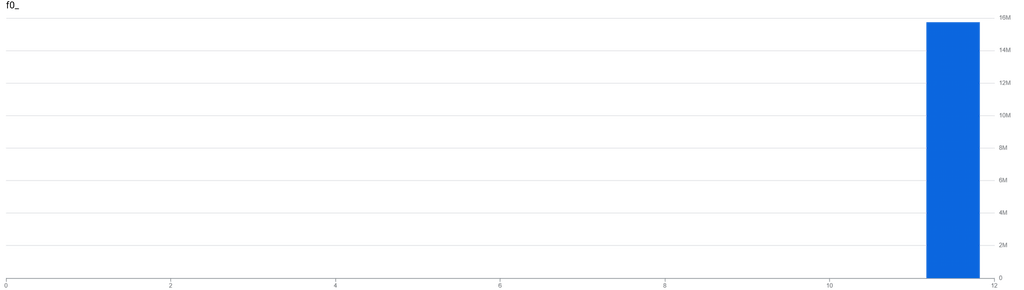
<p>However the distribution of views by title is heavily skewed towards the
<a href="https://de.wikipedia.org/wiki/Wikipedia:Hauptseite">homepage</a>,
which received 15,755,415 pageviews. The 90th percentile was a mere 48 pageviews.</p>
<p><img src="https://jameshartig.dev/_astro/title_distribution.CAN8DQ6E_Z2r3r5I.png" alt="Distribution of views by title" /></p>
<p>Because table sampling works at the block-level, the results are a lottery. If
your sample happens to include some homepage blocks, you’ll get a large
number otherwise it’ll be far too low.</p>
<p>I’m glad to see that Google finally acknowledges this and added a section outlining
how it performs on <a href="https://cloud.google.com/bigquery/docs/table-sampling#partitioned_and_clustered_tables">partitioned and clustered tables</a>
to the documentation. However, it should be much more prominent or the feature
should consider being removed completely. If you’re considering table sampling
you probably have a large table and if you have a large table you should be using
partitions and/or clustering.</p>
<p>The bias is most extreme when you have clustered data that is not evenly
distributed or when you’re using a small sample size. You can stick to using
<code>RAND()</code> your data isn’t suitable for <code>TABLESAMPLE</code>, especially for one-off
queries. But if you have a constant need for sampled data your archicture allows
for it, instead sample the data outside of BigQuery and write to a separate
“sample” table during insertion.</p>
<p><em>Note: BigQuery does not support the <code>BERNOULLI</code> sampling method.</em></p>
]]></content>
        <published>2025-11-08T00:00:00.000Z</published>
    </entry>
    <entry>
        <title type="html"><![CDATA[Golang Network Contains Improvements]]></title>
        <id>https://jameshartig.dev/2025-go-ipnet-improvements</id>
        <link href="https://jameshartig.dev/2025-go-ipnet-improvements"/>
        <updated>2025-10-06T00:00:00.000Z</updated>
        <summary type="html"><![CDATA[Go’s net package contains the IPNet struct to represent an IP network containing an IP and an IPMask. For example, a network like 192.168.0.1/24 would be stored as 192.168.0.1 and ffffff00. The struct...]]></summary>
        <content type="html"><![CDATA[<p>Go’s net package contains the <a href="https://pkg.go.dev/net#IPNet">IPNet</a> struct
to represent an IP network containing an <a href="https://pkg.go.dev/net#IP">IP</a> and an
<a href="https://pkg.go.dev/net#IPMask">IPMask</a>. For example, a network like
<code>192.168.0.1/24</code> would be stored as <code>192.168.0.1</code> and <code>ffffff00</code>. The struct
mainly offers a helper function <code>Contains(IP) bool</code>, that indicates whether a
given IP is contained within the network. You can use <code>ParseCIDR</code> to parse CIDR
notation into an <code>IPNet</code> struct.</p>
<p>In Go 1.21, the <code>ParseIP</code> method was <a href="https://go-review.googlesource.com/c/go/+/463987">changed</a>
(and later <a href="https://go-review.googlesource.com/c/go/+/598076">documented</a>) to
always return a 16-byte IP, representing IPv4 addresses as IPv4-mapped IPv6
addresses. The net package treats IPv4-mapped IPv6 addresses and IPv4 addresses
as equivalent, so this change should not have altered behavior.</p>
<p>However, <code>Contains</code> always calls <code>To4</code> on the provided IP:</p>
<pre><code class="language-go">if x := ip.To4(); x != nil {
  ip = x
}
</code></pre>
<p>This call previously did nothing for IPv4 addresses, but now it ends up slicing
the IP whenever it’s an IPv4-mapped IPv6 address (which, after the 1.21 change,
is all the time for IPv4 addresses).</p>
<pre><code class="language-go">func (ip IP) To4() IP {
	if len(ip) == IPv4len {
		return ip
	}
	if len(ip) == IPv6len &amp;&amp;
		isZeros(ip[0:10]) &amp;&amp;
		ip[10] == 0xff &amp;&amp;
		ip[11] == 0xff {
		return ip[12:16]
	}
	return nil
}
</code></pre>
<p>The conversion from IPv4-mapped to IPv4 is only a couple nanoseconds slower</p>
<pre><code>BenchmarkContainsV4-16                    88157508             12.51 ns/op
BenchmarkContainsV4Mapped-16              64967758             20.06 ns/op
BenchmarkContainsV6-16                    89194792             12.97 ns/op
</code></pre>
<p>which is insignificant unless you’re checking if an IP is contained against a
list of 1,000 networks.</p>
<pre><code>BenchmarkContainsV4List-16                  148334              7111 ns/op
BenchmarkContainsV4MappedList-16             90250             13092 ns/op
BenchmarkContainsV6List-16                  153919              7656 ns/op
</code></pre>
<p>This was discovered during an investigation into an increase in CPU usage
affecting certain servers in our fleet. On some servers, <code>Contains</code> accounted for
more than 30% of CPU time and a 7x increase in time spent running the garbage
collector. The difference between servers was related to the proportion of IPv4
vs IPv6 addresses that the server was handling.</p>
<h2>Solution 1: Custom Contains</h2>
<p>After we narrowed the problem down to the <code>To4</code> method my first attempt at a
solution was to write a custom function that checked for IPv4-mapped IPv6
addresses and handled them separately by checking the mask against the last 4
bytes without reslicing the IP. This solution reduced the time by more than 50%.</p>
<pre><code class="language-go">func Contains(ipn *net.IPNet, ip net.IP) bool {
	// explicitly check for ipv4-mapped ipv6 addresses
	if len(ip) == net.IPv6len &amp;&amp; bytes.HasPrefix(ip, v4InV6PrefixBytes) {
		// make sure ipnet is an ipv4 address
		if len(ipn.IP) != net.IPv4len {
			return false
		}
		// we only look at bytes 12 though 16
		for i := range ipn.IP {
			if ipn.IP[i] != ip[i+12]&amp;ipn.Mask[i] {
				return false
			}
		}
		return true
	}
	if len(ipn.IP) != len(ip) {
		return false
	}
	for i := range ipn.IP {
		if ipn.IP[i] != ip[i]&amp;ipn.Mask[i] {
			return false
		}
	}
	return true
}
</code></pre>
<pre><code>BenchmarkCustomContainsV4List-16             377374            3093 ns/op
BenchmarkCustomContainsV4MappedList-16       183717            5904 ns/op
BenchmarkCustomContainsV6-16                 174031            6102 ns/op
</code></pre>
<p>This restored stability to the service and reduced the CPU usage, but there was
still a large discrepancy between servers, and as the list of networks we checked
against grew, the difference became more pronounced.</p>
<h2>Solution 2: Optimized Lookups</h2>
<p>As I worked to improve the performance further I tried several things. First, I
should store the IPv4 and IPv6 networks separately and only check against the
relevant list. Second, I could swap <code>bytes.HasPrefix</code> for a string comparison
when determining if an IP is an IPv4-mapped IPv6 address. Finally, I can use the
prefix from the network as a key in a map to further reduce the number of
comparisons needed.</p>
<p>This resulted in something similar to:</p>
<pre><code class="language-go">type IPNetSet struct {
	m4 map[string][]*net.IPNet
	m6 map[string][]*net.IPNet
}

// Find returns the first IPNet that contains the given ip.
func (s *IPNetSet) Find(ip net.IP) (*net.IPNet, bool) {
	switch {
	case len(ip) == net.IPv4len:
		for _, e := range s.m4[string(ip[:1])] {
			if Contains(e, ip) {
				return e, true
			}
		}
	case len(ip) == net.IPv6len &amp;&amp; string(ip[:12]) == v4InV6Prefix:
		ip = ip[12:]
		for _, e := range s.m4[string(ip[:1])] {
			if Contains(e, ip) {
				return e, true
			}
		}
	case len(ip) == net.IPv6len:
		for _, e := range s.m6[string(ip[:2])] {
			if Contains(e, ip) {
				return e, true
			}
		}
	}
	return nil, false
}
</code></pre>
<p>With this solution, the time was reduced by almost 100x. The IP network
lookups now barely register in CPU usage and we can handle orders of magnitude
more networks if we had to. Additionally, there’s almost no difference between
the different forms of IPv4 IPs.</p>
<pre><code>BenchmarkMapContainsV4List-16               41507410         28.53 ns/op
BenchmarkMapContainsV4MappedList-16         43106853         28.75 ns/op
BenchmarkMapContainsV6-16                   33591614         32.12 ns/op
</code></pre>
<h2>Further Optimizations</h2>
<p>Currently, the map key only contains the first byte of IPv4 and the first 2 bytes
of IPv6 networks. The sweet spot largely depends on the distribution of the
networks and what your maximum mask is. I’ll likely explore tweaking these
further. But for now, the performance is good enough that I have more important
things to focus on.</p>
<p>The rest of the codebase used <code>net.IP</code> and switching everything over to the new
<code>net/netip</code> package would’ve been more work than I was willing to do at the time.
I’ll be exploring this further in the future as we move to <code>netip</code> in general. I
did benchmark the <code>netip.Prefix</code> method and it was much faster than <code>net.IPNet</code>
along with no difference between the different IP versions.</p>
<pre><code>BenchmarkNetIPContainsV4List-16             275042          4318 ns/op
BenchmarkNetIPContainsV4MappedList-16       269730          4592 ns/op
BenchmarkNetIPContainsV6List-16             239674          4715 ns/op
</code></pre>
<p><em>The code and benchmarks above can be found in
<a href="https://github.com/jameshartig/blog/tree/main/public/code/2025-go-ipnet-improvements">2025-go-ipnet-improvements</a>.</em></p>
]]></content>
        <published>2025-10-06T00:00:00.000Z</published>
    </entry>
</feed>